
311 for cities without a 311 department.
When the clerk, the public works director and two crews handle every request, Sentra 311 gives them one list, clear deadlines and a way to tell residents it’s done.
Small cities
311 for cities without a 311 department
In a city of 5,000 to 25,000 people, there is no 311 call center. Requests arrive at the front counter, by phone, through the website’s contact form and in conversations at the grocery store, and they’re handled by a clerk, a public works director and a couple of crews who already have full-time jobs. Sentra 311 is 311 software for small cities built around that reality.
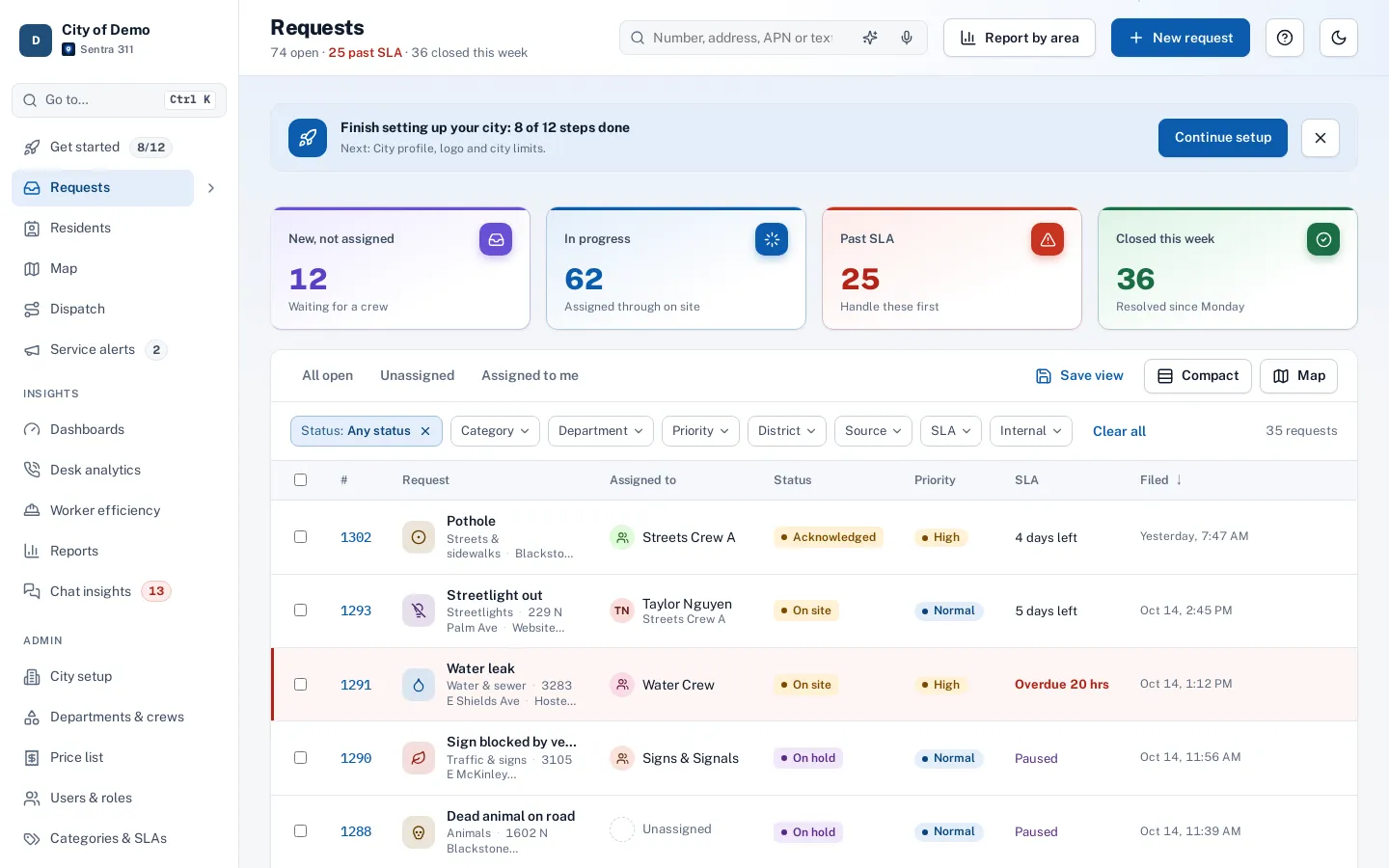
Every request, from every channel, lands in one request queue with a deadline. Residents report on a hosted report page or the resident app; the front desk files phone calls on one screen; crews close jobs with photos in the worker app. Residents get a request number and updates, and the city gets a record of every request and every fix.
What changes in the first month
The shared inbox goes quiet. Instead of forwarding emails and keeping a spreadsheet, staff see new, unassigned and overdue work in summary tiles each morning. Requests route themselves to the right department, so the clerk isn’t the switchboard anymore.
Residents stop calling to ask whether anyone got their report, because they got a number and an email. The knowledge base answers the questions that were never really requests — trash day, bulky items, who owns a pole light — before they’re filed.
No IT project
Sentra 311 is hosted. There’s no server to install and no software to update. The report page runs on your city’s subdomain, the website widget is one script tag your communications person can paste in, and the apps run in any phone browser. The one-time setup builds your request types, routing and branding with you and trains your staff over Teams.
Priced for a small city budget
Pricing is one plan priced by your city’s population: every city gets every feature, with no per-seat fees, no feature tiers and no add-ons. AI and Spanish are included, staff, residents and field workers are unlimited, and setup and training are part of onboarding. See pricing and why we price by population, not by seat.
How setup works
Setup starts with a conversation about how requests reach you today and who handles them.
- Together we build your request types and their questions, routing to departments and crews, deadlines in your business hours and holidays, and your report page’s look.
- Your staff are trained over Teams, and the one-time setup fee covers all of it.
- Your city website gets a “Report a problem” button with one script tag, and your history can be imported with the importer, with an undo button if anything needs another pass.
After launch, your own staff change request types, forms, routing and deadlines from the admin portal. The built-in help center has guides for city staff and field workers, and Ask Sentra 311 answers how-to questions inside the product.
Accessibility, security and privacy
Public pages and apps are built to WCAG 2.1 AA and checked with automated accessibility tests on every release, an important consideration as the ADA Title II web rule deadlines approach.
- Each city’s data is kept separate, permissions are enforced by the server, and every change is recorded in an audit log.
- Usage analytics are cookie-free, residents’ contact details are shown only to staff who need them, and AI features never receive residents’ personal details.
- See security and accessibility.
How it works
- Admin
Start from a library
Pick common request types and adjust their questions, departments and deadlines.
- Admin
Put it on your website
A “Report a problem” button with one script tag, and a link residents can share.
- City staff
A few people work it
One queue for the whole city, with filters and saved views for each person.
- Everyone
Show the results
Dashboards and a public performance page, with no extra work.
Why it fits
One list instead of an inbox
Calls, emails, the website and the app all land in the same queue.
Start from a library
Begin with common request types; your staff can change everything later.
No IT project
Hosted, with a report page on your own subdomain and a widget for your website.
One plan, priced by population
Every feature for every city, with unlimited staff, residents and field workers.
Explore the features
Report page & widget
A hosted report page and one script tag for your city site
Learn moreQueue & search
One list for every request, searchable by voice
Learn moreWorker app
Today’s jobs, routes and close-out on a phone
Learn moreTrack & updates
Request numbers, tracking pages and email updates
Learn moreKnowledge base
Answers before anyone files a request
Learn moreEmail to request
Residents email your city; staff turn it into a request in a click
Learn moreQuestions cities ask
We only get a few requests a day. Is 311 software worth it?
Even a few requests a day add up to a thousand a year, each one a phone call, an email or a note. One queue with deadlines, updates and a record of the fix saves staff time and gives the city numbers for budget and council conversations.
Who on our staff runs it?
Usually the city clerk or public works director as admin, with crews using the worker app. No IT staff is required.
Can we start small?
Yes. Many cities start with the report page, the queue and a handful of request types, then add dispatch, reports and the public performance page.
Do residents need to download an app?
No. The report page works in any browser; the app is optional.