
Plan the day’s routes in minutes.
Pick a date, the workers and the jobs. Sentra 311 splits the jobs by area, orders each route by real drive time along streets, and assigns them when you confirm.
What it does
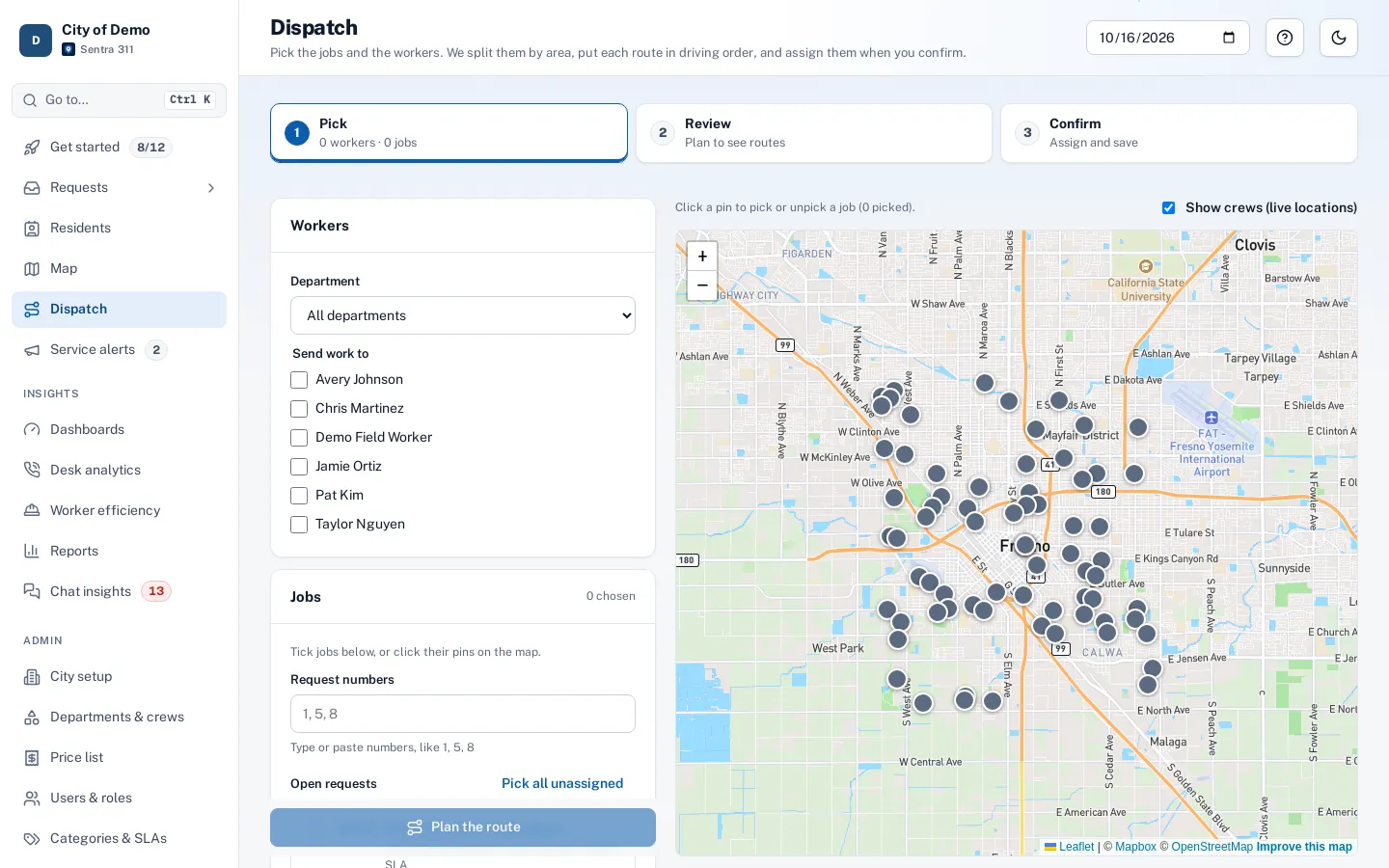
Sentra 311’s dispatch screen turns a list of open requests into a plan for the day. Pick the date, the workers and the jobs — from the open queue, or by typing request numbers like “1, 5, 8” — and choose a start point such as the yard. Sentra 311 splits the jobs between workers by area and orders each worker’s stops by real drive time along the streets.
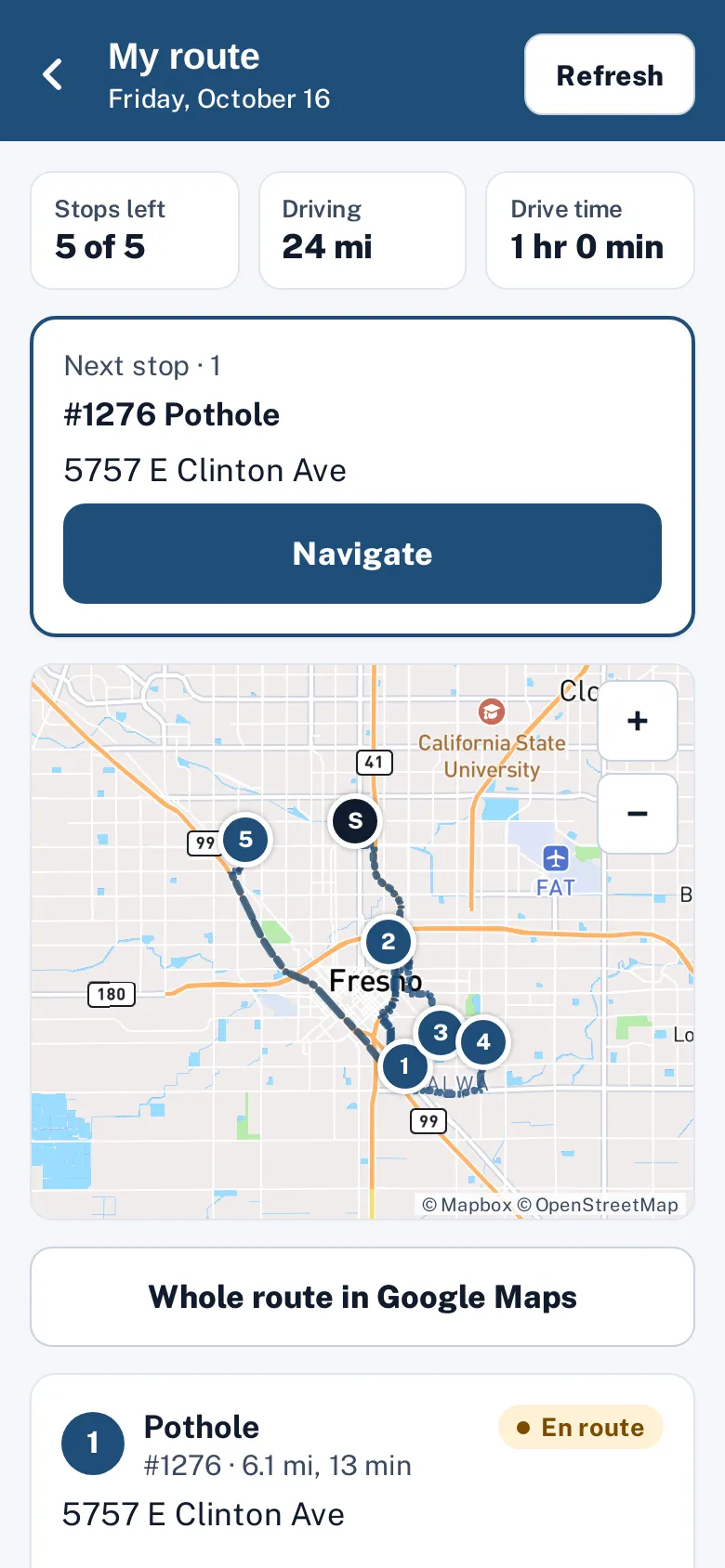
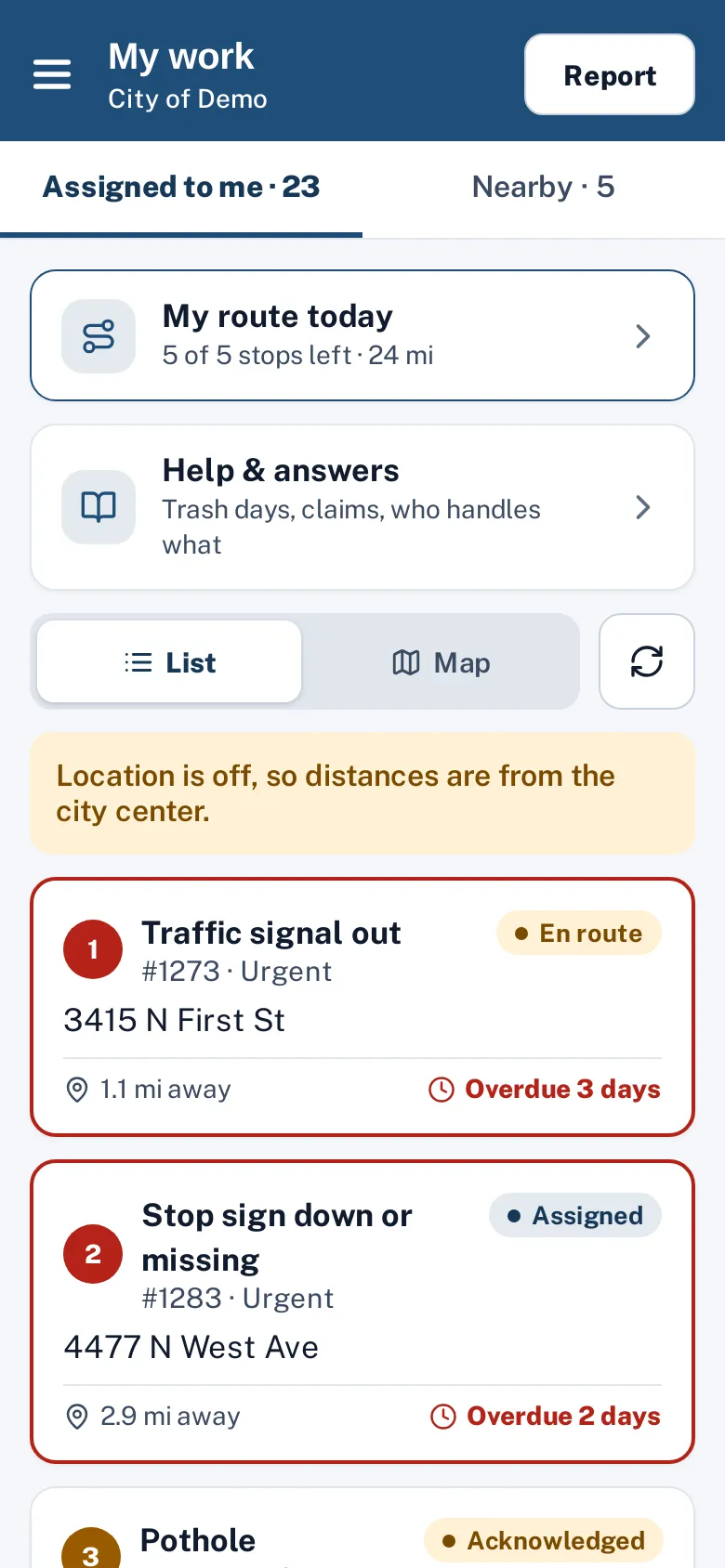
The dispatcher adjusts the plan by dragging stops, moving a job to another worker, or using up and down buttons from the keyboard, then confirms. Confirming assigns every request, saves each worker’s route, and puts it on their phone in the worker app as “My route today”. Print one route sheet per worker for crews who prefer paper.
Dispatchers plan routes in their heads, and crews crisscross town.
How it works
- Dispatcher
Pick workers and jobs
From the open list, or type numbers like "1, 5, 8".
- Dispatcher
Review the plan
Each worker’s route on the map in its own color, with miles and drive minutes.
- Dispatcher
Adjust and confirm
Drag, reorder or move jobs between workers; confirm assigns them.
- Crew
Print or send to phones
One page per worker with stops, addresses, miles and drive minutes, plus a Google Maps directions link.
Key features
Street routes, not straight lines
Drive times and paths from Mapbox along real streets, with an open-source fallback.
Several workers at once
Balanced by area; each worker gets a color on the map.
Edit before confirming
Drag and drop, move to another worker, reorder or remove; “Best order” re-optimizes.
Printable route sheets
One page per worker with directions links.
On the worker’s phone
Next stop, a Navigate button and the full route in Google Maps.
Live crew locations
Optional, opt-in dots for workers who share location.
A day with it
The dispatcher chooses tomorrow’s date, selects three workers and adds jobs: all open sidewalk and pothole requests in the east half of the city, plus requests 1, 5 and 8 typed in directly.
- The start point is the corporation yard.
- Sentra 311 splits the jobs into three areas, orders each worker’s stops by drive time, and shows each route on the map in its own color with numbered stops, miles and drive minutes.
- The dispatcher moves one job to another worker, drags another to the top of a list, and confirms.
- Each request is assigned, each worker has a saved route for the day, and the routes appear in the worker app.
- Routes can be printed one page per worker, with stops in order, addresses, type, notes, miles and minutes for each leg and directions links.
- A route can be edited after confirming; changes re-measure the route.
In practice
- Twelve pothole jobs, three workers. The dispatcher splits them by area and each worker gets an ordered route in a minute.
- A paper sheet for the truck. Printed route sheets list stops in order with miles and directions links.
- A change mid-morning. An urgent job is added to the closest worker’s route and re-ordered by drive time.
Drive times you can trust
Drive times and paths come from Mapbox’s routing along real streets, with an open-source router as a fallback and a straight-line estimate only if both are unavailable (marked “est.”). Long routes are calculated in pieces, and repeated calculations are cached, so planning stays fast.
Accessibility, security and privacy
Routes show miles and drive minutes; field workers see only their own routes. Location sharing is separate and opt-in.
Getting started
Set each department’s yard or usual start point, then plan the first routes with the dispatcher during setup training.
Who uses it
Dispatchers and supervisors
Plan the day in minutes.
Crews
Know their stops and the best order.
Public works directors
Fewer miles per job, measured in worker efficiency.
Questions cities ask
Do workers need a special device?
No. Any phone or iPad with a browser.
Does routing cost extra?
No. Routing is included for every city.
Can a worker change their own order?
The order can be updated through the system; reorder buttons in the app are on our roadmap.
Can field workers plan routes?
No. Planning and confirming routes is for dispatchers and supervisors; workers see their own route.
How many workers can we plan at once?
As many as the jobs need; jobs are split by area between the workers you choose.
Can we start from a yard instead of the first job?
Yes. Choose the start point when planning; it’s used for the first leg.