
Close the loop with every resident.
Every request gets a number and a tracking page. Residents get an email when work starts and when it’s done, with the after photo.
What it does
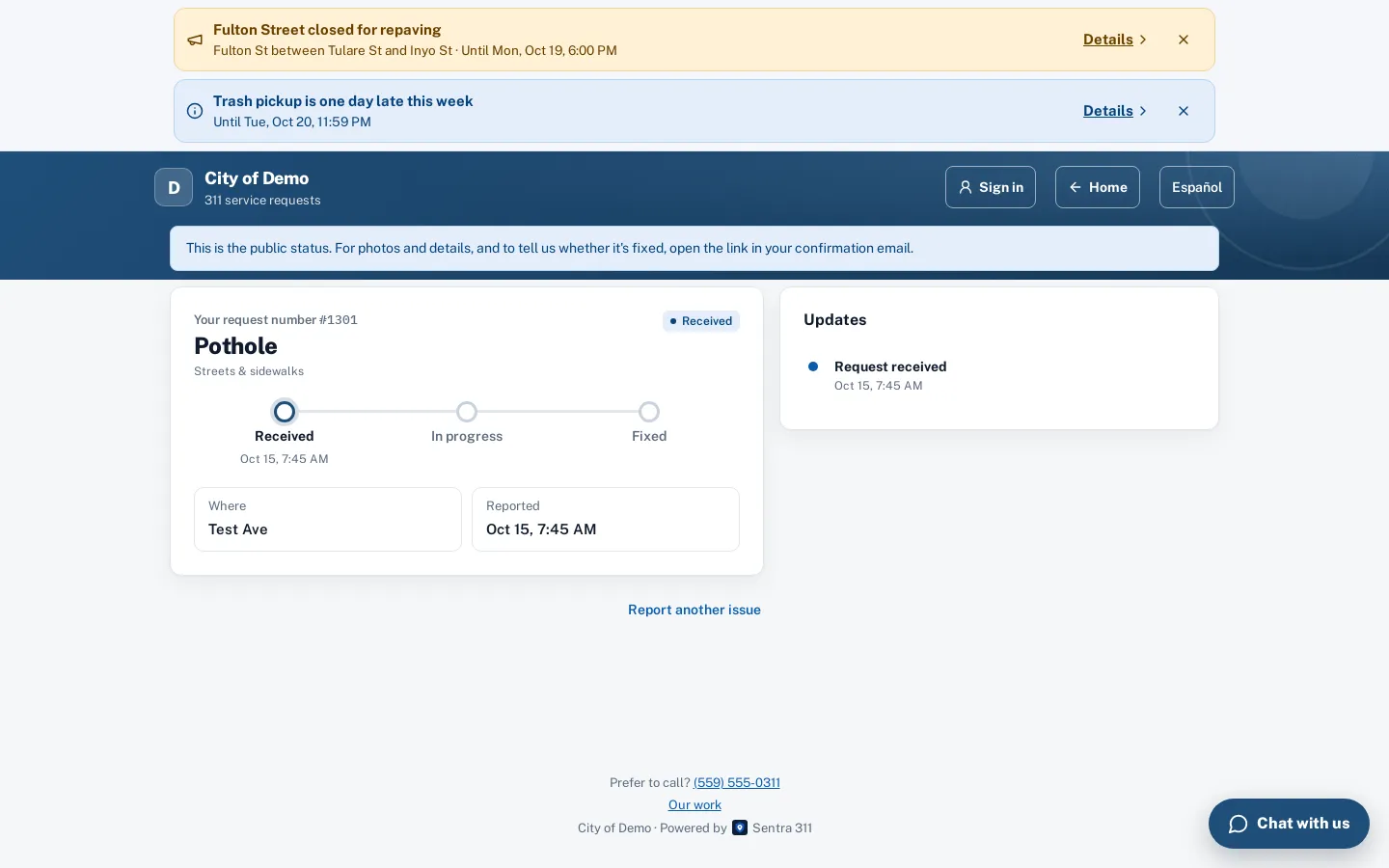
Every Sentra 311 request gets a number and a private tracking link the moment it’s filed. The tracking page shows a simple progress tracker — Received, In progress, Fixed — with the public updates staff choose to share, the resident’s own answers and photos, and the crew’s after photo when one is taken.
Residents can also look up any request by number on the public tracking page. Without the private link, they see only the public status: the type, the street (never the house number) and the public updates. When a request is resolved, the resident can rate the work and, within seven days, reopen it if it isn’t fixed.
When residents never hear back, they report the same thing again, or call to ask.
How it works
A number right away
And a tracking link on screen and in the confirmation email.
One email per real change
Received, work started, fixed. No duplicates.
Before and after
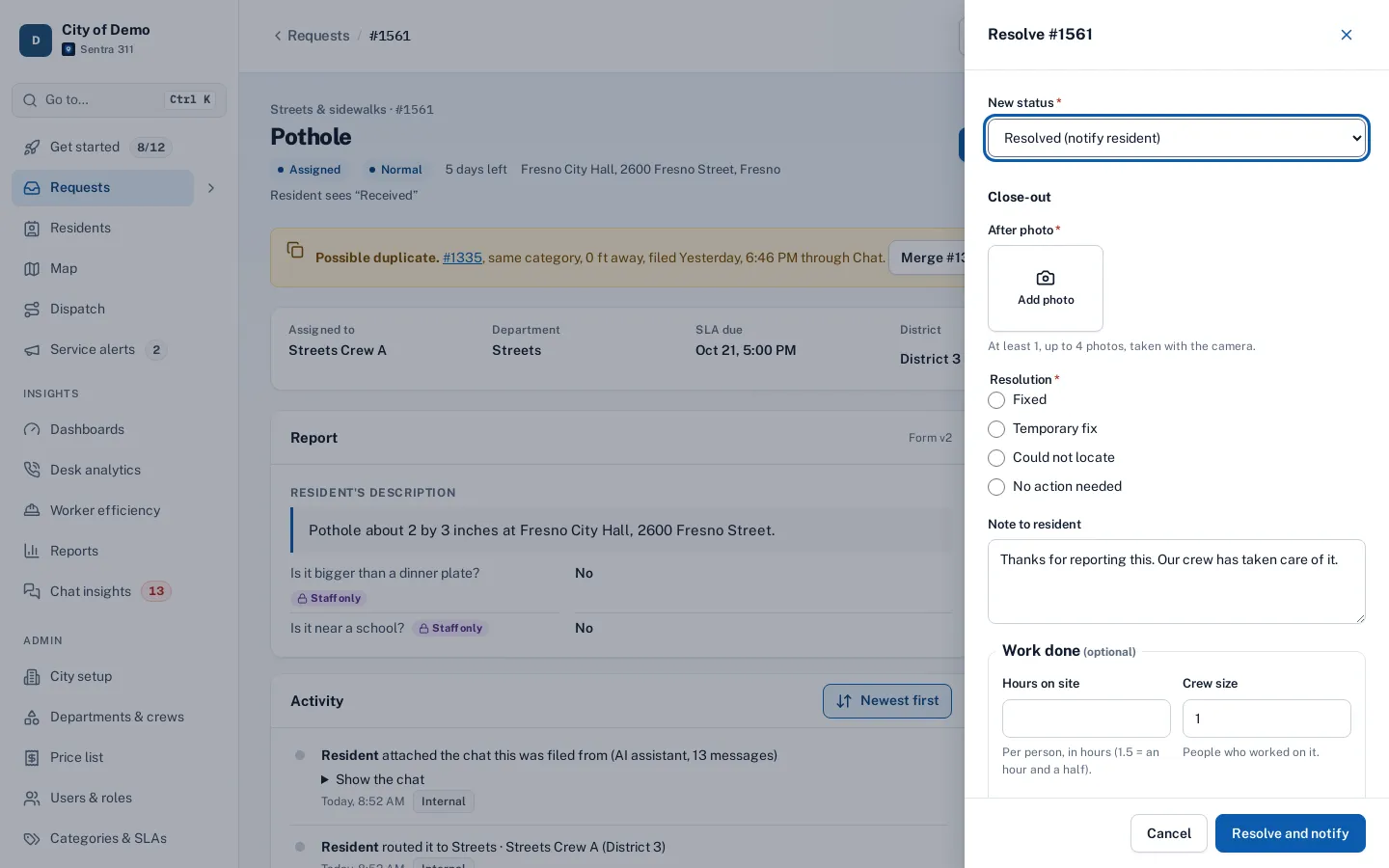
The fix email shows the crew’s photo and note. Not fixed? Reopen within 7 days.
Key features
Progress tracker
Received, In progress and Fixed, with honest outcomes for referrals, duplicates and requests that couldn’t be fixed.
Email updates in English and Spanish
One email per real change: received, work started, fixed (with the after photo and the crew’s note), referred, or closed without a fix.
Editable templates
Every email can be edited in Admin › Notifications with a preview and a test send.
Track by number
A public lookup by request number that shows only public fields.
Rate and reopen
A one-to-five rating and “Is it fixed?” with reopen within seven days, routed back to a supervisor.
“Me too” followers
Residents who follow a request get the same updates as the person who filed it.
A day with it
Sentra 311 sends one email for each change that matters to the resident: when the request is received; when work starts; when it’s fixed, with the crew’s note and after photo; when it’s referred to another agency, with that agency’s contact details; when it’s merged into another request; and when it’s closed without a fix, with the reason in plain words.
- If a request is fixed within minutes of being filed, residents get one combined email instead of two.
- Every email is checked against a send log so the same update is never sent twice.
- Staff can also send a public reply from the request page at any time; it’s emailed to the resident and to anyone following the request, and appears on the tracking page.
In practice
- “Did anyone get my report?”. The resident has a request number and a tracking link from the first minute, so they don’t call to ask.
- A referral to the county. The resident sees “Sent to the county” with the county’s phone number, not “Closed”.
- Not fixed after all. A resident taps “No, reopen” within seven days and the request goes back to a supervisor.
Private tracking link and public lookup
The tracking link in the confirmation and emails is private: it shows the resident’s own answers and photos along with the status. Anyone can look up a request by its number on the public tracking page, which shows only the type, the street without the house number, the status and public updates.
Accessibility, security and privacy
Emails are sent once per real change, checked against a send log, so residents aren’t flooded. Text message updates are on our roadmap; today updates are by email.
Getting started
The default emails are ready to use; most cities adjust the wording and add their phone number before going live.
Who uses it
Residents
Know where their request stands without calling.
Front desk
Fewer status calls; when someone calls, the same page answers them.
Supervisors
Ratings and reopens show where work needs a second look.
Questions cities ask
Do you send texts?
Email today. Text message updates are coming.
Do you send text messages?
Not yet. Text updates are on our roadmap; email is available today.
Can staff send a personal reply?
Yes. A public reply from the request page emails the resident and followers and appears on the tracking page.
Can residents unsubscribe?
Yes. Residents choose email updates or none when reporting, and signed-in residents can change it on their account page.
Do followers see the original reporter’s details?
No. Followers see the public status and updates only.
How do residents rate a request?
From the tracking page or the app after the request is resolved, on a one-to-five scale with an optional comment.