
For cities with several departments and a council to report to.
Routing by type and district, SLAs in business time, dispatch for several crews, and reports for every council district.
Mid-size cities
For cities with several departments and a council to report to
Cities of 25,000 to 100,000 people have the workload of a big city and the staffing of a small one: several departments, several crews, council districts and a steady flow of requests from residents, council offices and staff in the field. Sentra 311 is citizen request management sized for them.
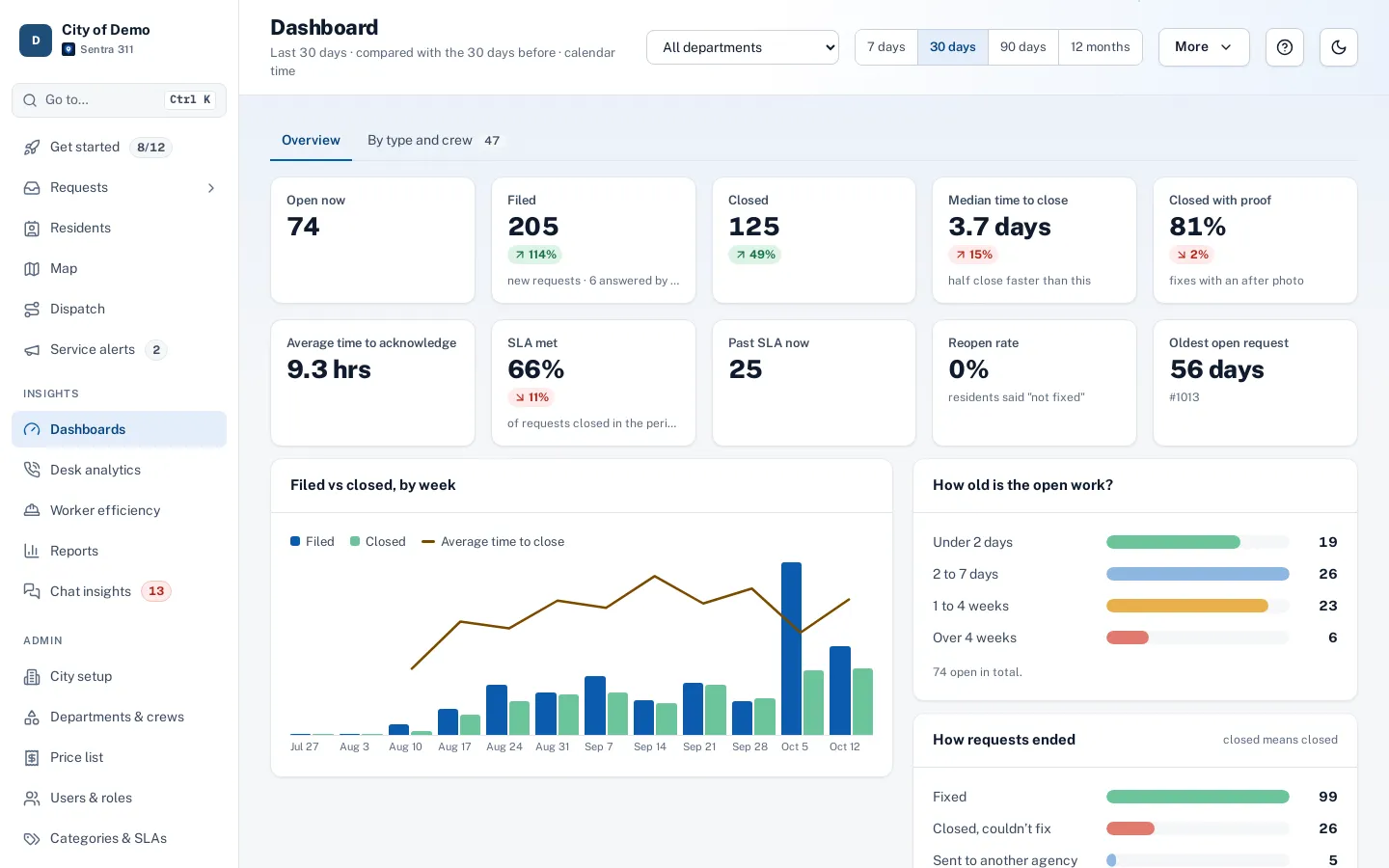
Routing rules send each request type — or each type in each council district — to the right department and crew. SLAs run in business hours with your holidays, and escalations notify a supervisor when work passes its deadline. Department heads get dashboards with time to close, SLA met and backlog age, compared with the previous period.
Crews that close with proof
Dispatchers plan routes for several workers, ordered by drive time, and crews work from the worker app on phones or iPads. Closed means closed rules can require an after photo or an on-site step before a request is resolved, and referrals to other agencies are never shown to residents as closed.
Worker efficiency reports measure travel and on-site time, SLA met and callbacks per worker — a fair view of workload when it’s time to talk about staffing.
Council-ready reporting
Council district reports show what’s happening in each district and arrive in council inboxes on a schedule. Twelve report types group by department, type, channel or any of your GIS layers, and the public performance page shows residents the work the city has done, with before-and-after photos.
Pricing
Pricing is one plan priced by your city’s population: every city gets every feature, with no per-seat fees, no feature tiers and no add-ons. Staff, residents and field workers are unlimited, so adding a department or a seasonal crew doesn’t change the price. See pricing.
How setup works
Setup starts with a conversation about how requests reach you today and who handles them.
- Together we build your request types and their questions, routing to departments and crews, deadlines in your business hours and holidays, and your report page’s look.
- Your staff are trained over Teams, and the one-time setup fee covers all of it.
- Your city website gets a “Report a problem” button with one script tag, and your history can be imported with the importer, with an undo button if anything needs another pass.
After launch, your own staff change request types, forms, routing and deadlines from the admin portal. The built-in help center has guides for city staff and field workers, and Ask Sentra 311 answers how-to questions inside the product.
Accessibility, security and privacy
Public pages and apps are built to WCAG 2.1 AA and checked with automated accessibility tests on every release, an important consideration as the ADA Title II web rule deadlines approach.
- Each city’s data is kept separate, permissions are enforced by the server, and every change is recorded in an audit log.
- Usage analytics are cookie-free, residents’ contact details are shown only to staff who need them, and AI features never receive residents’ personal details.
- See security and accessibility.
How it works
- Resident
Residents report anywhere
The report page, website widget, resident app, AI chat and phone entry all feed one queue.
- City staff
Routed to departments
Each type goes to its department or crew, with SLAs in business hours and escalations.
- Dispatcher
Dispatched along streets
Dispatchers plan routes for several workers, ordered by drive time.
- Council
Reported by district
Council district reports arrive in council inboxes on a schedule.
Why it fits
Every department, one system
Routing, escalations and dashboards per department.
Council-ready reports
District reports emailed on a schedule.
Crews that close with proof
Worker app, dispatch routes and "closed means closed".
Show the work
A public performance page with before-and-after photos.
Explore the features
Dispatch & routes
Plan jobs for one or more workers, routed by drive time
Learn moreDistrict reports
What’s happening in each district, emailed
Learn moreDashboards
How each department is doing, at a glance
Learn moreClosed means closed
Proof to close, honest status for residents
Learn morePerformance page
Show residents the work you’ve done
Learn morePublic records (PRA)
Draw an area and a date range, export every request as CSV or PDF
Learn moreQuestions cities ask
Can each department keep its own process?
Yes. Each department has its own request types, SLAs, close-out forms and crews, and department heads see their own dashboards.
Can sensitive requests stay private?
Yes. Restricted departments keep their requests hidden from staff outside them and from public pages.
How do we move our history over?
With the importer, which maps your old categories and can undo an import in one step.